LiteBlue Login – USPS Employee Sign-In, MFA & ePayroll Guide
LiteBlue is the U.S. Postal Service’s employee website. USPS employees use it to see pay stubs and W-2s, manage benefits in PostalEASE, check their eOPF and read postal news. This guide walks you through signing in, setting up multifactor authentication (MFA) and fixing common login problems.
LiteBlue Login – Quick Information
| Official login | liteblue.usps.gov |
| You need | 8-digit Employee ID (EIN) and Self-Service Profile (SSP) password |
| Extra security | Multifactor authentication (MFA) is required |
| MFA options | Okta Verify, Google Authenticator, text message, voice call or email |
| Help | HR Shared Service Center (HRSSC): 1-877-477-3273 |
Watch out: Many look-alike “LiteBlue” sites use addresses ending in .us, .com or .site. The only real LiteBlue site ends in usps.gov. Never type your Employee ID or password anywhere else.
What You Need to Log In
- Your 8-digit Employee ID number (EIN), which is on your pay stub
- Your Self-Service Profile (SSP) password
- Your MFA method, such as your phone, authenticator app or email
How to Log In to LiteBlue
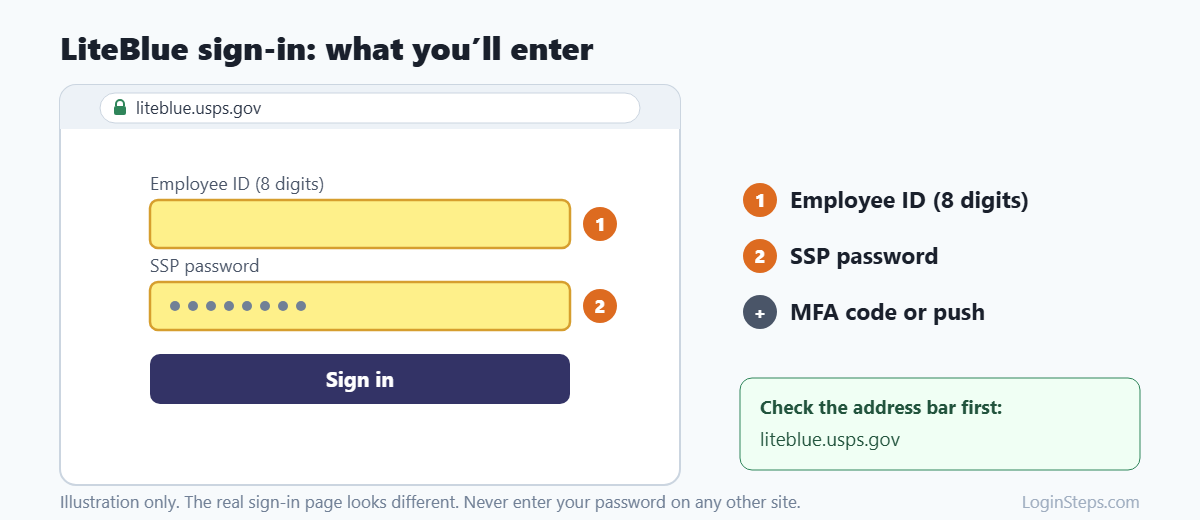
- Type liteblue.usps.gov into your browser’s address bar. Don’t click links in search ads or emails.
- Click Sign In.
- Enter your 8-digit Employee ID.
- Enter your SSP password.
- Confirm your sign-in with your MFA method, such as a push in Okta Verify, a 6-digit code or an email code.
- You’re now on the LiteBlue homepage.
First-Time Setup: Multifactor Authentication (MFA)
LiteBlue requires MFA. The first time you sign in, you’ll be asked to set it up:
- Sign in with your Employee ID and password (or temporary password).
- Create a new password if you’re asked to.
- Confirm the last four digits of your Social Security number. Only do this on the official usps.gov page.
- Choose at least one MFA method. USPS recommends Okta Verify or Google Authenticator. Text, voice call and email also work.
- Set up a security question.
- Finish signing in to confirm everything works.
Tip: Set up more than one MFA method, such as an app plus email. That way you can still sign in if you lose or change your phone.
How to View Your Pay Stub and W-2
- Sign in to LiteBlue.
- Open My HR and choose ePayroll.
- Pick a pay period to see your earnings statement.
- For tax forms, look for W-2 in ePayroll. W-2s are usually posted in January.
Other Things You Can Do on LiteBlue
- PostalEASE: Change direct deposit, tax withholding, allotments and benefits (including Open Season changes)
- eOPF: View your electronic Official Personnel Folder
- eCareer: Look for and apply to internal job postings
- Employee news: Read postal updates and announcements
Forgot Your Password or Locked Out?
- On the LiteBlue sign-in page, choose Forgot Password or Unlock Account.
- Verify yourself with the MFA method you set up.
- Create a new SSP password.
- If you can’t verify yourself, call the HR Shared Service Center at 1-877-477-3273.
Forgot your Employee ID? It’s printed on your earnings statement. Your supervisor can also give it to you.
Frequently Asked Questions
What is the official LiteBlue website?
It’s liteblue.usps.gov. Any address that doesn’t end in usps.gov is not run by the Postal Service.
Is my LiteBlue password the same as my PostalEASE password?
You sign in to LiteBlue with your SSP password. PostalEASE may also ask for your USPS PIN. You can reset the PIN through your Self-Service Profile.
Can I use LiteBlue on my phone?
Yes. LiteBlue works in a mobile browser. You still need your Employee ID, password and MFA method.
Can former USPS employees use LiteBlue?
Access usually ends when you leave the Postal Service. For W-2s or pay records after you leave, call the HR Shared Service Center at 1-877-477-3273.
Why do I have to use MFA every time?
USPS requires MFA to protect employee IDs, passwords and personal data. It’s part of every sign-in.
Conclusion
Go to liteblue.usps.gov and sign in with your Employee ID and SSP password. Set up at least two MFA methods so you’re never locked out. For help, call the HR Shared Service Center.
Related guides: ADP Login · Costco Employee Login · Paylocity Login
LoginSteps is an independent guide and is not affiliated with the United States Postal Service. We never ask for your login details. Always sign in only on the official LiteBlue website at liteblue.usps.gov. Read our disclaimer.