How to Get Your W-2 From Paychex (Paychex Flex & Oasis)
If your employer runs payroll through Paychex, you can usually download your W-2 online. Paychex has two employee systems, Paychex Flex and Paychex Oasis, and the steps differ a little. This guide covers both, based on Paychex’s W-2 FAQ.
Paychex W-2 – Quick Information
| Paychex Flex | paychexflex.com → Tax Documents |
| Paychex Oasis | Oasis employee portal, or paper W-2 by mail |
| Flex login help | 800-741-6277, or chat on the login page |
| Oasis W-2 hotline | 866-641-8699 (8am–8pm ET) |
| Deadline | 2026 W-2s are due by February 1, 2027 |
How to Download Your W-2 in Paychex Flex
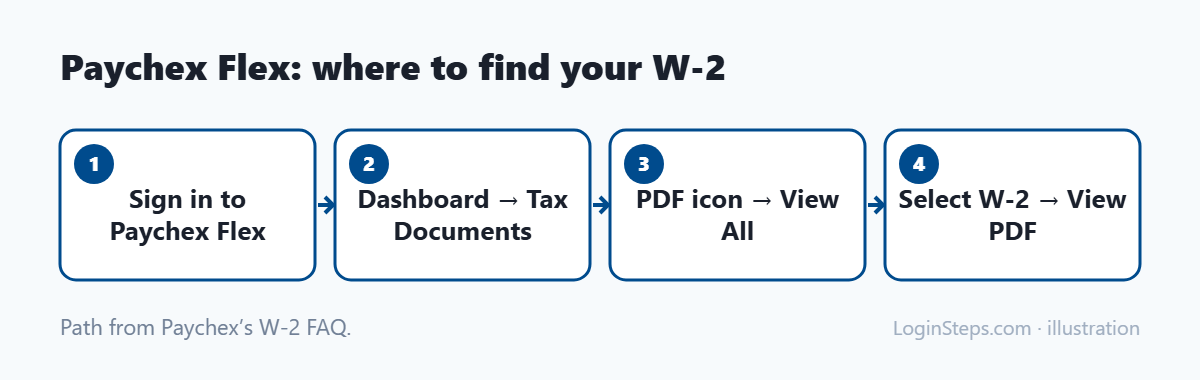
- Sign in at paychexflex.com or in the Paychex Flex app. New? See our Paychex Flex login guide.
- On your dashboard, find Tax Documents.
- Click the PDF icon, then View All.
- Select your W-2 and click View PDF to download or print it.
Timing: last tax season, Paychex made W-2s available in Paychex Flex in early January, ahead of the legal deadline.
Not registered? You can register for Paychex Flex once you’ve received your first paycheck.
Paychex Oasis W-2s
If your employer uses Paychex Oasis (a PEO service), you get your W-2 through the Oasis employee portal. If you don’t register for electronic delivery by the deadline Oasis sets in January, a paper W-2 is mailed to you. Address changes have to be made by the end of December. For Oasis W-2 help, call 866-641-8699.
Former Employees
- Contact your former employer first. They control your access and your W-2.
- If the company still uses Paychex, try signing in to Paychex Flex or Oasis. Your account may still work.
- Still nothing? Call the IRS at 800-829-1040. Paychex points employees to the IRS if they haven’t received a W-2 by the January deadline. The IRS itself suggests calling after the end of February.
Corrections and Reprints
- Corrected W-2 (W-2c): Paychex says W-2c forms are processed in February. Ask your employer first. For Oasis, you can also call 866-641-8699.
- Reprints: download a copy from the portal. Paychex notes that extra mailing fees apply for mailed reprints.
Frequently Asked Questions
Where is my W-2 in Paychex Flex?
Dashboard → Tax Documents → PDF icon → View All → select the W-2 → View PDF.
Can Paychex send me my W-2 if I left the company?
Start with your former employer. If they still use Paychex, you may be able to sign in. Otherwise, the IRS can help.
What’s the difference between Paychex Flex and Oasis?
They’re separate Paychex systems with different logins and support lines. Your pay stubs or your HR team can tell you which one your employer uses.
Conclusion
Download your W-2 from Paychex Flex under Tax Documents, or through the Oasis portal if your employer uses Oasis. For corrections or missing forms, start with your employer, then Paychex support or the IRS.
Related: W-2 from a former employer · How to read your W-2
LoginSteps is an independent guide, not a tax advisor. For advice about your own situation, talk to a tax professional or see IRS.gov. Read our disclaimer.