How to Get Your W-2 From Gusto (Web, App & Former Employees)
If you’re paid through Gusto, your W-2 is posted in your Gusto account, and you keep access even after you leave the job. Here’s how to find it, based on Gusto’s help center.
Gusto W-2 – Quick Information
| Where | app.gusto.com → Documents |
| When | Gusto emails you in mid to late January when it’s ready |
| How long | 10 years of access, as long as your email on the account stays current |
| Former employees | Yes, you can still sign in and download it |
How to Download Your W-2 on the Web
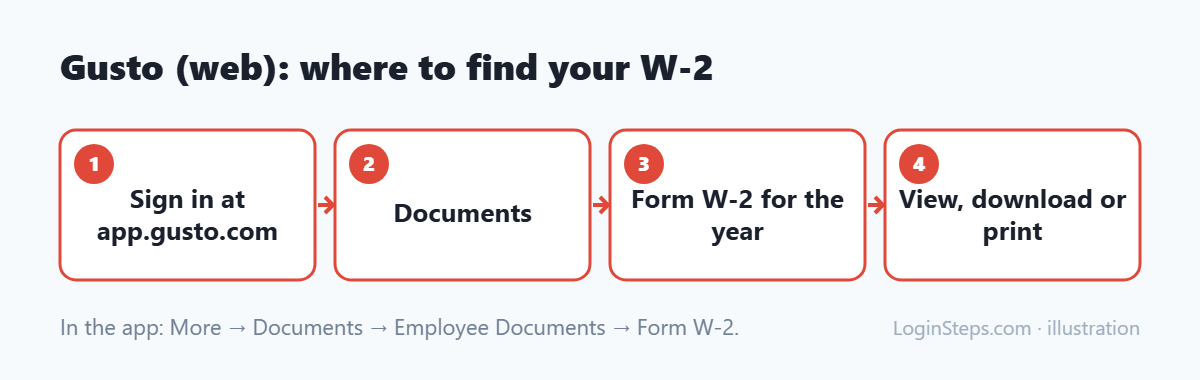
- Sign in at app.gusto.com. Need help? See our Gusto login guide.
- Go to Documents.
- Select Form W-2 for the year you need.
- View, download or print it.
How to Find Your W-2 in the Gusto App
- Open the Gusto Mobile app and sign in.
- Tap More in the bottom-right corner.
- Tap Documents, then Employee Documents.
- Select Form W-2.
Worked for More Than One Gusto Employer?
Each employer has its own profile in Gusto. Switch between your profiles to find the W-2 from each company.
W-2 Missing or Wrong?
- Missing: contact your employer. Gusto files W-2s for employees who got taxable wages if the company is still active with Gusto, or if it chose to file when it closed its account.
- Wrong: ask your employer to correct it. They start the correction in Gusto.
- Still nothing by the end of February: call the IRS at 800-829-1040. See missing W-2 help.
Frequently Asked Questions
Can I get my W-2 from Gusto after I quit?
Yes. Former employees keep access to their Gusto profile and tax documents.
How long does Gusto keep my W-2s?
Gusto says you have access for 10 years, as long as you keep the email address on your account up to date.
When will my Gusto W-2 be ready?
Gusto emails employees in mid to late January. The legal deadline for 2026 W-2s is February 1, 2027.
Conclusion
Sign in to Gusto and open Documents (or More → Documents in the app) to get your W-2, even as a former employee. For missing or wrong forms, contact your employer first.
Related: How to read your W-2 · W-2 deadline
LoginSteps is an independent guide, not a tax advisor. For advice about your own situation, talk to a tax professional or see IRS.gov. Read our disclaimer.