How to Get Your W-2 From Paycom (Year-End Tax Forms Guide)
If your employer uses Paycom, your W-2 is in Paycom’s Employee Self-Service (ESS). Here’s exactly where to find it, based on Paycom’s tax document page.
Paycom W-2 – Quick Information
| Where | ESS → My Payroll → Year-End Tax Forms → W-2 tab |
| When | Online and by mail by the deadline (February 1, 2027 for 2026 W-2s) |
| Address deadline | December 31 of the tax year |
| Former employees | Contact your former employer’s HR or payroll team |
How to Download Your W-2 in Paycom
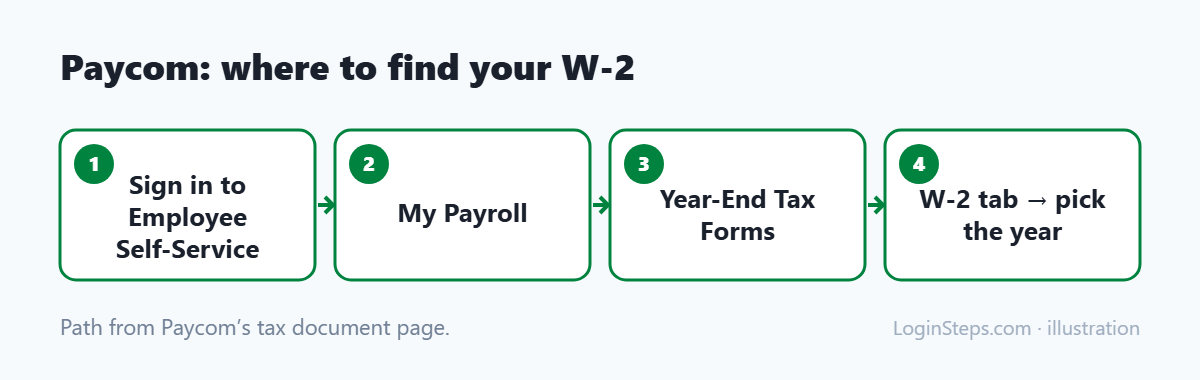
- Sign in to Paycom Employee Self-Service. See our Paycom login guide.
- Open My Payroll.
- Choose Year-End Tax Forms.
- Click the W-2 tab and open the year you need.
Update Your Address Before Year-End
If you get a paper W-2, make sure Paycom has your current address by December 31:
- Go to My Information, then Address and Contact Information.
- Click edit, make your changes, and select Update Contact Information.
Former Employees
Paycom says that once you no longer work for a company, you can’t get tax documents through Paycom’s system. Contact that company’s HR or payroll team for your W-2. See how to get your W-2 from a former employer.
Other Tax Forms in Paycom
- Form 1095-C: health coverage information, usually available by early March
- Form 1099: for contractors paid through Paycom
Frequently Asked Questions
Where is my W-2 in Paycom?
My Payroll → Year-End Tax Forms → W-2 tab in Employee Self-Service.
Can Paycom send me my W-2 after I leave?
No. Paycom directs former employees to their former employer’s HR or payroll team.
What if my W-2 hasn’t arrived?
Contact your employer. If you still don’t have it by late February, call the IRS at 800-829-1040 with your details and your employer’s.
Conclusion
Current employees can download their W-2 under My Payroll → Year-End Tax Forms. Keep your address current by December 31. Former employees should contact the employer directly.
Related: How to read your W-2 · W-2 deadline
LoginSteps is an independent guide, not a tax advisor. For advice about your own situation, talk to a tax professional or see IRS.gov. Read our disclaimer.