How to Get Your W-2 From UKG (UKG Pro, UKG Ready & Kronos)
UKG (formerly Kronos and UltiPro) has several products, and where your W-2 lives depends on which one your employer uses. Here’s how to find it in UKG Ready and UKG Pro. Not sure which you have? See our UKG login guide.
UKG W-2 – Quick Information
| UKG Ready | Menu → My Pay → Forms → W2 |
| UKG Pro | Your Pay section → W-2 / year-end tax forms (menus vary by employer) |
| Deadline | 2026 W-2s are due by February 1, 2027 |
| Help | Your employer’s HR, payroll or UKG administrator |
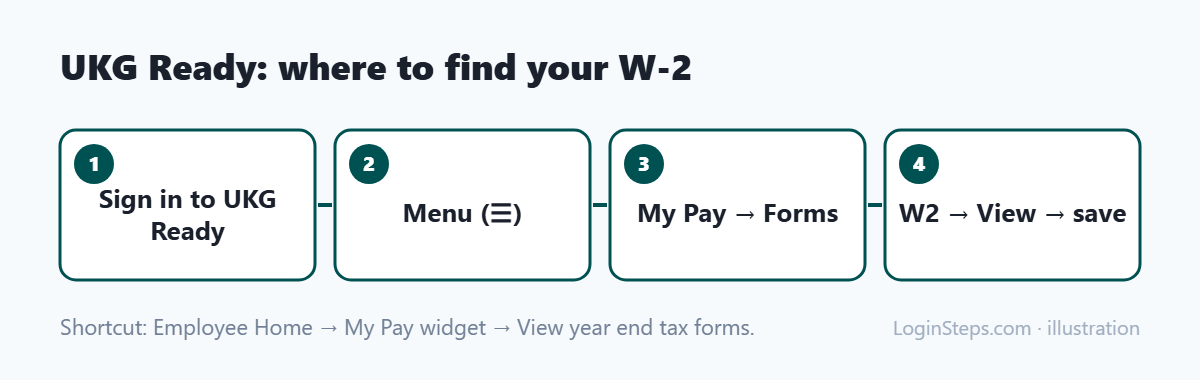
How to Get Your W-2 in UKG Ready
- Sign in to UKG Ready with your company’s link.
- Select the menu icon (three lines) in the top-left corner.
- Choose My Pay, then Forms.
- Click W2 and find the tax year.
- Select the View icon, then save or print the form.
Shortcut: on the Employee Home tab, find the My Pay widget and select View year end tax forms. These steps come from an employer’s UKG Ready help article.
How to Get Your W-2 in UKG Pro
- Sign in to UKG Pro using your employer’s link or the UKG Pro app (with your company access code).
- Open your Pay area (sometimes under Myself or My Pay).
- Look for W-2 or year-end tax forms, choose the year and open the PDF.
UKG Pro menus depend on how your employer set it up. If you can’t find your W-2, ask HR or payroll where it’s posted.
Former Employees and Errors
- Left the company? Access often ends when you leave. Contact your former employer’s payroll team. See W-2 from a former employer.
- Something wrong? Ask your employer for a corrected W-2 (W-2c). UKG can’t change it for you.
Frequently Asked Questions
Where is my W-2 in UKG?
In UKG Ready: Menu → My Pay → Forms → W2. In UKG Pro: your Pay area, under W-2 or year-end tax forms.
Can I call UKG for my W-2?
No. UKG works for your employer, so contact your HR or payroll team.
Is Kronos the same as UKG?
Yes. Kronos merged with Ultimate Software to form UKG, and the products now carry UKG names.
Conclusion
In UKG Ready, go to My Pay → Forms → W2. In UKG Pro, look in your Pay area for W-2 or year-end tax forms. For anything else, contact your employer’s payroll team.
Related: How to read your W-2 · W-2 deadline
LoginSteps is an independent guide, not a tax advisor. For advice about your own situation, talk to a tax professional or see IRS.gov. Read our disclaimer.